
Free macOS app
ShrinkAgent 縮小担当
Drop images and they're instantly resized and saved.
No dialogs. No extra steps.
Features
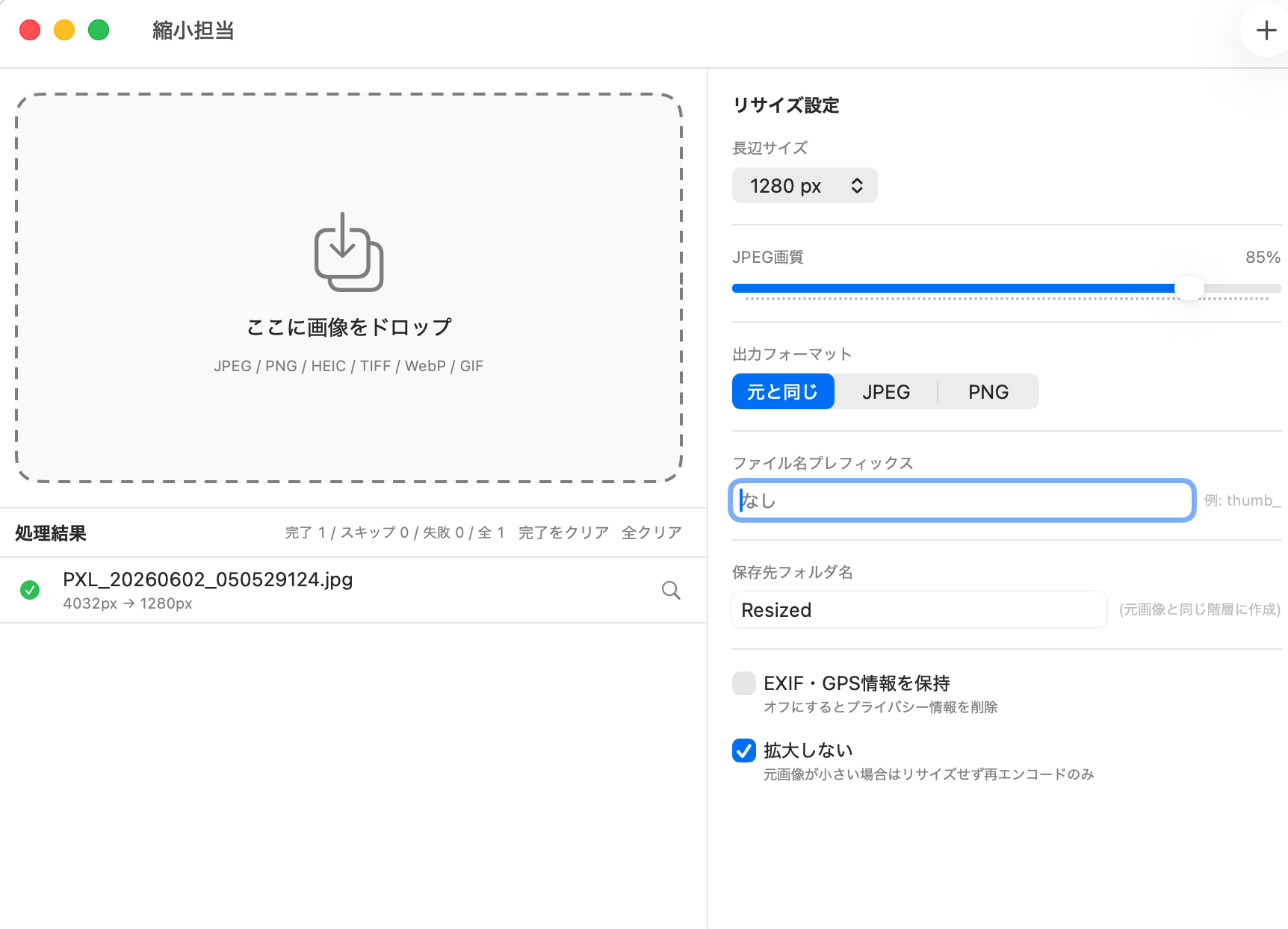
Drag & drop — instant processing
Drop images or entire folders from Finder onto the window. Processing starts immediately, no dialogs needed.
Finder Quick Action
Right-click any image in Finder and choose "Shrink this image" from Services / Quick Actions. Uses your saved settings instantly — no need to open the app.
Long-edge size presets
Choose from 640 / 800 / 1280 / 1920 / 2560 px presets, or enter any custom value from 10 to 30,000 px. Aspect ratio is preserved automatically.
JPEG quality slider
Fine-tune compression from 0–100%. Balance quality and file size to suit your workflow.
Output format selection
Keep original, or convert to JPEG, PNG, or WebP. Handles HEIC, TIFF, and WebP input too.
EXIF & GPS data stripping
Location and camera metadata are removed by default to protect privacy. Toggle on to preserve metadata when needed.
Multi-core parallel processing
Built on Swift Concurrency + TaskGroup to fully utilize all CPU cores. Handles large batches with ease.
Command-line tool
The bundled shrinkit command compresses images from scripts and automations, including a watch mode that auto-processes a folder.
Shortcuts integration
Works with the "Compress images" action in the macOS Shortcuts app — trigger fixed compression from the share sheet or Finder.
Getting started
Download & unzip
Expand the ZIP to get ShrinkAgent.app.
Move to Applications
Drag ShrinkAgent.app to your Applications folder. That's all the installation needed.
Drop your images
Drag image files or folders onto the window — resizing starts instantly.

Supported formats
| Input | Output |
|---|---|
| JPEG, PNG, HEIC, TIFF, GIF, WebP | JPEG, PNG, HEIC, TIFF, WebP |
Note: GIF files saved as "Keep original" are converted to JPEG. WebP stays WebP under "Keep original" (EXIF/metadata is not preserved for WebP output).
Release history
- Added presets: save long edge, quality, format, metadata policy, filename affixes and target size together, then apply them from the settings popup, CLI, or Shortcuts
- Added a target file size (JPEG / WebP only), auto-adjusting quality and dimensions to fit
- Metadata (EXIF) is now a three-way choice: strip all / strip location only / keep all
- Added a filename suffix, with {w} and {h} placeholders for the output dimensions
- Results now show the size change
- Files excluded as unsupported or cut by the queue limit are now reported instead of silently dropped
- CLI JSON output is now schema version 2
- Renamed the command-line tool's command from shrinkagent to shrinkit
- If you already installed the CLI, uninstall and reinstall it via "Command Line Tool (shrinkit)…" in the menu
- Added the shrinkagent command-line tool (with folder watch mode)
- Added macOS Shortcuts integration
- Added WebP output (kept as WebP under "Keep original")
- Added "Shrink this image" Finder Quick Action (Services / Quick Actions)
- Fixed sequential numbering on filename collisions
- Improved color space preservation for TIFF output
- Initial release
Download for free
macOS 14 Sonoma or later · Developer ID signed · Free
Download (v1.3.0)
See the user manual for detailed usage.
A freeware app developed and distributed by IT Niseko LLC.
Feedback and bug reports welcome via the contact form.